Maldives beat Malaysian U23 by 4 - 1

Sunday, November 29, 2009


Maldives wins their second friendly in Malaysia by 4-1. This time the SAFF champions thrashed Malaysia under 23 side, thanks to goals from ace strikers Ali Ashfaaq (Dhagandey) and Ahmed Thoriq (Tom). Dhagandey scored a hat trick and Tom added the other. Maldives scored two goals in either half and Malaysia managed to get a consolation goal late in the second half.

It was first believed that Maldives played against Under 21. However, according to national team coach, Mauroof Ahmed (Maattey), the match was played against Under 23 side.

Earlier on Thursday, Maldives beat Malaysia senior team by 1-0 in an international friendly.

Maldives will travel to Dhaka from Kuala Lumpur on December 1st. Maldives, the defending champions, are placed in group A with India, Nepal and Afghanistan.

India is believed to be sending their under 23 team to the champioship while Nepal is in full gear for the tournament.

Nepal beat Indian league outfit Mohan Bagan by 3-1 and in their next friendly game they came from behind to beat Bhutan 2-1.

Maldives preparation for the tournament include a 10 day training camp in Bahrain, where they played against the top clubs of the country. Maldives drew two games and lost the other two.

Maldives played another friendly against Ulsan Hyundai of South Korea in Male' on November 21st, which the visitors won by 2-1.

Date Cracker 2000

Saturday, November 28, 2009


Data Cracker 2000 is an application which can easily remove the date protection (i.e. trail protection) from many software. It is very useful for shareware or trial versions of software which expire after a specific date. When you crack the software with DateCracker 2000, the software will always show something like “There are 90 days remaining in your trial period” and the software will actually last forever. Some programs have good protection and it isn’t possible to remove their date protection.


How to use Date Cracker?

1. Download Date Cracker and install it

2. When you open Date cracker you will see on the

right side Add button , click it

3. Now a window will appear where you must type the Program Description ( for example Folder Lock 6), as shown below

4. In Simulated Run Date type the expiration date, like 28. 11. 2009 ;

5. On the bottom of Date Cracker window , you will see … , click it , and choose executable files as shown below


Advanced SystemCare Free (3.4.1)

Friday, November 27, 2009


This utility offers a one-stop-shop for cleaning and maintaining your computer for better overall system performance. The interface is very simple, featuring only a few buttons, which makes it easy to get down to cleaning immediately (in fact, it automatically runs on start-up) and doesn't confuse you with multiple steps.

The Maintain Windows section focuses on four areas of maintenance: spyware removal, Registry cleaning, a privacy sweep, and deletion of junk files. The Diagnose System button provides system optimization tools, detects spyware, defragments your disk, and scans for hijacked Windows settings. In our tests the scan and clean for each of these areas took less than 10 minutes to complete. In many of these scans, it is difficult to tell what exactly is being accomplished by some of the tools, but we were able to test against other trusted apps, which confirmed Advanced SystemCare's efficacy in those areas.

Under the utilities section you are given several tools, which are similar to plug-ins, for other areas of optimization and diagnostic tests. Overall, Advanced SystemCare Free is a good way to maintain your system's speed and clear out junk files, but you'll need to remember to run it regularly because scheduling of scans is only available in the paid Pro version.


FastStone Capture

Thursday, November 26, 2009


FastStone Capture
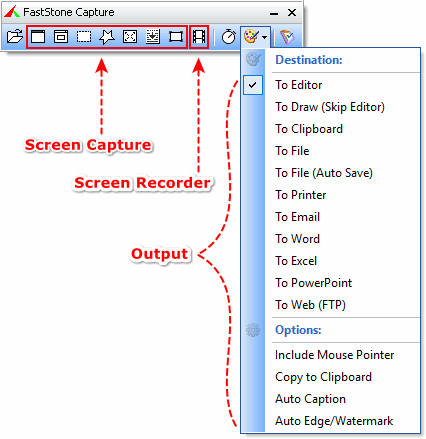
is a powerful, lightweight, yet full-featured screen capture tool that allows you to easily capture and annotate anything on the screen including windows, objects, menus, full screen, rectangular/freehand regions and even scrolling windows/web pages. You can choose to send captures to editor, file, clipboard, printer, email, Word/PowerPoint document or upload them to your website. Editing tools include annotating (texts, arrowed lines, highlights), resizing, cropping, sharpening, watermarking, applying edge effects and many more. It also allows you to record screen activities and sound into highly compressed video files. Other features include global hotkeys, automatic filename generation, support for external editors, a color picker, a screen magnifier and a screen ruler.

FastStone Capture saves files in BMP, GIF, JPEG, PCX, PNG, TGA, TIFF and PDF formats.


Maldives Beat Malaysia in a Friendly


Maldives beat Malaysia 1-0 in the friendly game played in Malaysia today. Ali Ashfaaq (Dhagandey) scored the winner in the second half from a penalty kick.

“The players played well and played the way the coach want” Maattey said just few minutes after the game.

“Even though we scored from a penalty, our boys created chances to score”

“We expect a better result in our next game on Sunday” he added.

Reports also confirmed that there isn’t any injury issue in the team.

Maldives will play the second game against Malaysia’s under 21 side on Sunday. Maldives, the defending champions of SAFF championship, will then travel to Dhaka from Kuala Lumpur for this year’s event which will be held from December 4- 14th.

Maldives had a 10 day training camp in Bahrain early this month where they played four friendly games and drew two and lost the rest.

Maldives also played a friendly game against South Korean outfit Ulsan Hyundai last Saturday where they lost the game by 2-1, once again Dhagandey was the scorer.

Maldives is placed in group A in the SAFF championship with Nepal, India and Afghanistan. Maldives will start the campaign on December 5th against Nepal.

Source: MaldiveSoccer

How To Speed up PC Using Notepad

» Open Notepad and Type mystring=(80000000)


» Save it to the Desktop as ram.vbe


Tip: • You can type any name when saving it.. the end of it should be ".vbe" . Eg: mypc.vbe
• If this doesn't work save as type: All Files

µTorrent (1.8.5)

Tuesday, November 24, 2009

µTorrent is the world's most popular BitTorrent client. Most of the features present in other BitTorrent clients are present in µTorrent, including bandwidth prioritization, scheduling, RSS auto-downloading and Mainline DHT (compatible with BitComet). Additionally, µTorrent supports the Protocol Encryption joint specification (compatible with Azureus 2.4.0.0 and above, BitComet 0.63 and above) and peer exchange.


Cool Tricks with a USB Thumb Drive

Saturday, November 21, 2009

» Set a program to run automatically (autorun):
Using autorun, you can set a program to start up automatically when you connect the drive to a computer. You can also use the same script for a data CD-ROM. Note that some computers have autorun disabled for security purposes.
Open up notepad and paste the following script:

[autorun]
ShellExecute=filename
Label=description
UseAutoPlay=1

Make sure you replace filename with the full path to the file. For example, a file called program.exe in a folder called “programs” on the thumb drive would be /programs/program.exe
Replace description with a short description of the program, for example, My Jukebox or Mozilla Firefox.
Save the file as autorun.inf, making sure you select “All Programs” from the save menu, not “Text document”!

» Portable jukebox
Don’t just carry the music with you, also carry the player! You can install audio programs such as WinAmp and CoolPlayer+ on your thumb drive. Just unextract the ZIP folders to the USB drive.
If you want the jukebox to start up automatically when you connect the memory stick to the computer, use the autorun feature and point it to the exe of your audio player.

» Encrypt your data
If you carry any sensitive indormation on your USB memory stick, a good idea is to encrypt it. Hardware-level encryption will help, but it will cost extra. You can get a free program to encrypt your data just as securely. For this I recommend TrueCrypt, but most others will also do.
You will need admin access on the computer you want to use your encrypted thumb drive on, so this it’s usability a little.
» Take your programs with you
We all know how frustrating it is when we take your files to another computer just to discover that the software required to read the files is not installed.
Here’s the simplest solution – take your programs with you – on your USB thumb drive. Here’s how to do it with Portable Apps:
1. Go to the Portable Apps website and download the installer, choosing the software you want to carry along.
2. Run the installer and install the software to the root of your USB thumb drive.
And you’re done! As soon as you connect your thumb drive into a computer, Portable Apps will open up automatically.

Freestyle Soccer Tricks & Skills

Thursday, November 19, 2009

powered by Blogger | WordPress by Newwpthemes